1. 题目考点
这道题主要考 3 个基础点:
input()读取字符串- 函数参数的使用
- 字符串拼接 / f-string 格式化输出
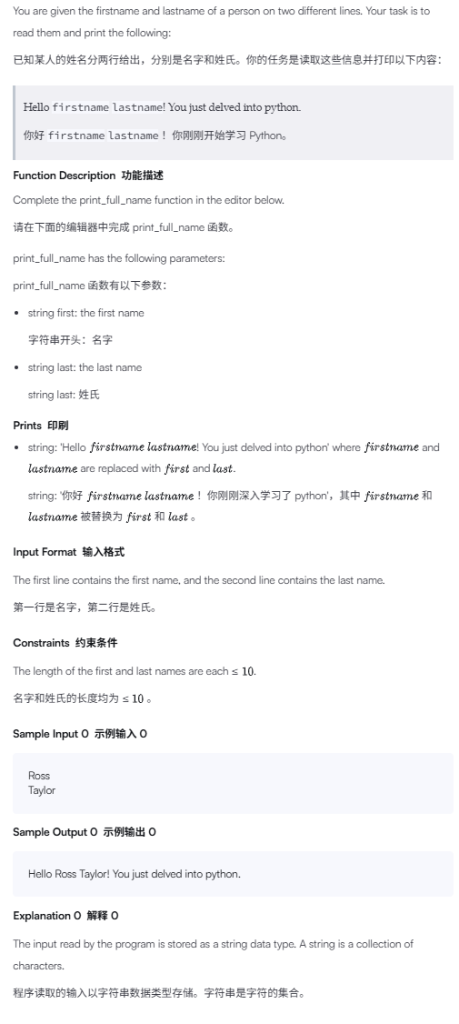
这题不是计算题,也不是判断题。它的核心是:把输入的 firstname 和 lastname 放进固定句子里,并按要求打印出来。
2. 审题
题目给你两行输入:
Ross
Taylor
第一行是名字,存到 first 里。
第二行是姓氏,存到 last 里。
题目要求输出:
Hello Ross Taylor! You just delved into python.
注意几个细节:
Hello后面有一个空格。first和last中间有一个空格。last后面紧跟!,中间没有空格。python是小写。- 句子末尾有一个英文句号
.。 - 函数
print_full_name(first, last)负责打印结果,不需要返回值。
3. 思路提示
先不要急着写代码。你可以这样想:
题目要你打印的是一个固定模板:
Hello firstname lastname! You just delved into python.
其中 firstname 和 lastname 不是固定文字,而是要替换成输入进来的内容。
所以程序要做的事情很简单:
第一步,函数接收两个参数:
first
last
第二步,把它们放进句子里:
Hello + first + 空格 + last + ! You just delved into python.
第三步,用 print() 打印出来。
这里最推荐初学者使用 f-string,因为它最直观:
print(f"Hello {first} {last}! You just delved into python.")
其中:
{first}
表示把变量 first 的值放到这里。
{last}
表示把变量 last 的值放到这里。
4. 完整设计思路
这道题可以拆成 3 步。
第一步:理解函数参数
题目已经规定了函数:
def print_full_name(first, last):
这里的 first 和 last 是函数的参数。你可以理解成:外面把名字和姓氏传进来,函数内部负责使用它们。
如果输入是:
Ross
Taylor
那么调用函数时,大致相当于:
print_full_name("Ross", "Taylor")
进入函数后:
first = "Ross"
last = "Taylor"
第二步:组织输出句子
题目要求的格式是:
Hello first last! You just delved into python.
所以变量应该放在这两个位置:
Hello {first} {last}! You just delved into python.
如果 first = "Ross",last = "Taylor",替换后就是:
Hello Ross Taylor! You just delved into python.
第三步:在函数里打印
这道题的函数不要求你 return,而是要求你直接 print。
所以函数内部只需要一行:
print(f"Hello {first} {last}! You just delved into python.")
5. 代码实现
如果平台给你的模板是这样的:
def print_full_name(first, last):
    # Write your code here

if __name__ == '__main__':
    first_name = input()
    last_name = input()
    print_full_name(first_name, last_name)
你只需要补全函数内部即可:
def print_full_name(first, last):
    print(f"Hello {first} {last}! You just delved into python.")

if __name__ == '__main__':
    first_name = input()
    last_name = input()
    print_full_name(first_name, last_name)
这里也可以用字符串拼接写:
def print_full_name(first, last):
    print("Hello " + first + " " + last + "! You just delved into python.")
但对初学者来说,f-string 更清楚,也更不容易漏空格。
6. 模板代码解释
这一段:
if __name__ == '__main__':
你现在可以先简单理解为:
这下面的代码是程序真正开始运行的地方。
这一句:
first_name = input()
表示读取第一行输入,保存到变量 first_name。
这一句:
last_name = input()
表示读取第二行输入,保存到变量 last_name。
最后这一句:
print_full_name(first_name, last_name)
表示调用你写的函数,把 first_name 和 last_name 传进去。
7. 运行演示
假设输入是:
Ross
Taylor
程序执行过程如下:
第一行:
first_name = input()
读到:
first_name = "Ross"
第二行:
last_name = input()
读到:
last_name = "Taylor"
然后调用函数:
print_full_name(first_name, last_name)
相当于:
print_full_name("Ross", "Taylor")
进入函数后:
first = "Ross"
last = "Taylor"
执行:
print(f"Hello {first} {last}! You just delved into python.")
最终输出:
Hello Ross Taylor! You just delved into python.
8. 方法总结
这一类题一般有一个明显特征:题目给你固定输出格式,中间有几个地方需要替换成变量。
以后看到这种题,可以按这个顺序思考:
- 先找输入是什么。
- 再找输出格式是什么。
- 看输出中哪些部分是固定文字。
- 看输出中哪些部分要换成变量。
- 用 f-string 把变量放进固定句子里。
- 最后检查空格、标点、大小写是否完全一致。
这类题最容易错的地方不是逻辑,而是格式。例如漏掉空格、漏掉感叹号、把 python 写成 Python,都会导致答案错误。
9. 练习
请你自己尝试写一个类似函数。
题目:
输入两行:
Jack
Smith
要求输出:
Welcome Jack Smith to the Python class.
函数模板:
def welcome_student(first, last):
    # 在这里写代码

if __name__ == '__main__':
    first_name = input()
    last_name = input()
    welcome_student(first_name, last_name)
提示:固定句子是:
Welcome first last to the Python class.
你需要把 first 和 last 放到对应位置。
print(“Hello ” + first + ” ” + last + “! You just delved into python.”), print(f”Hello {first} {last}! You just delved into python.”)这两句有什么区别?
这两句输出结果完全一样,区别主要在于“字符串怎么拼出来”。
第一句是字符串拼接:
print("Hello " + first + " " + last + "! You just delved into python.")
第二句是 f-string 格式化字符串:
print(f"Hello {first} {last}! You just delved into python.")
1. 第一种:用 + 拼接字符串
这一句:
print("Hello " + first + " " + last + "! You just delved into python.")
可以拆开看:
"Hello "
+
first
+
" "
+
last
+
"! You just delved into python."
假设:
first = "Ross"
last = "Taylor"
那么拼接过程就是:
"Hello " + "Ross" + " " + "Taylor" + "! You just delved into python."
最后得到:
Hello Ross Taylor! You just delved into python.
这种写法的特点是:把多个字符串一段一段用 + 连起来。
缺点是比较容易漏空格,比如你写成:
print("Hello" + first + last + "! You just delved into python.")
输出就会变成:
HelloRossTaylor! You just delved into python.
因为 "Hello" 后面没有空格,first 和 last 中间也没有空格。
2. 第二种:用 f-string 放入变量
这一句:
print(f"Hello {first} {last}! You just delved into python.")
前面的 f 表示这是一个 f-string。
你可以理解成:这个字符串里允许直接放变量。
{first}
表示把变量 first 的值放到这里。
{last}
表示把变量 last 的值放到这里。
假设:
first = "Ross"
last = "Taylor"
那么:
print(f"Hello {first} {last}! You just delved into python.")
就相当于打印:
Hello Ross Taylor! You just delved into python.
这种写法的优点是:句子整体看起来更像最终输出的样子,变量直接放在对应位置,比较不容易把空格和标点弄乱。
3. 两种写法的核心区别
| 写法 | 思路 | 优点 | 缺点 |
|---|---|---|---|
"Hello " + first + " " + last | 用 + 把字符串拼起来 | 基础,容易理解字符串拼接 | 容易漏空格,变量多时很乱 |
f"Hello {first} {last}" | 在字符串里直接放变量 | 清晰,接近最终输出格式 | 需要知道 f 和 {} 的用法 |
对于初学者,我更建议你优先使用 f-string。
因为你可以直接对照题目要求的输出格式来写:
题目要:
Hello firstname lastname! You just delved into python.
你就写:
print(f"Hello {first} {last}! You just delved into python.")
变量放哪里,输出就出现在哪里。
4. 还有一个重要区别:遇到数字时
如果变量是字符串,两种写法都可以。
比如:
name = "Tom"
print("Hello " + name)
print(f"Hello {name}")
都没问题。
但是如果变量是数字,用 + 拼接就容易报错。
例如:
age = 18
print("I am " + age + " years old.")
这会报错,因为 "I am " 是字符串,age 是整数,Python 不允许直接把字符串和整数用 + 拼接。
你必须手动转换:
age = 18
print("I am " + str(age) + " years old.")
而 f-string 可以直接写:
age = 18
print(f"I am {age} years old.")
所以 f-string 更方便。
5. 这道题推荐写法
这道题最推荐写成:
def print_full_name(first, last):
    print(f"Hello {first} {last}! You just delved into python.")
因为这句和题目要求的输出格式几乎一模一样,最容易检查:
Hello Ross Taylor! You just delved into python.
你只要确认:
{first}
对应 Ross,
{last}
对应 Taylor,
其他文字、空格、标点完全照抄题目即可。
6. 小练习
把下面这句用两种方式写出来。
已知:
first = "Jack"
last = "Smith"
要求输出:
Welcome Jack Smith!
提示:
用 + 拼接时,要特别注意 "Welcome " 后面的空格,以及 first 和 last 中间的空格。
用 f-string 时,可以直接照着输出格式写:
print(f"Welcome {first} {last}!")